How DNS Works!!!
What is DNS? DNS is basically the internet's phonebook.
Like, if you use any browser and enter a domain like google.com or linkedin.com, your computer can't understand google.com directly. Computers basically communicate with IP addresses.
Like: google.com --> 140.250.195.14
Let's understand this more easily:
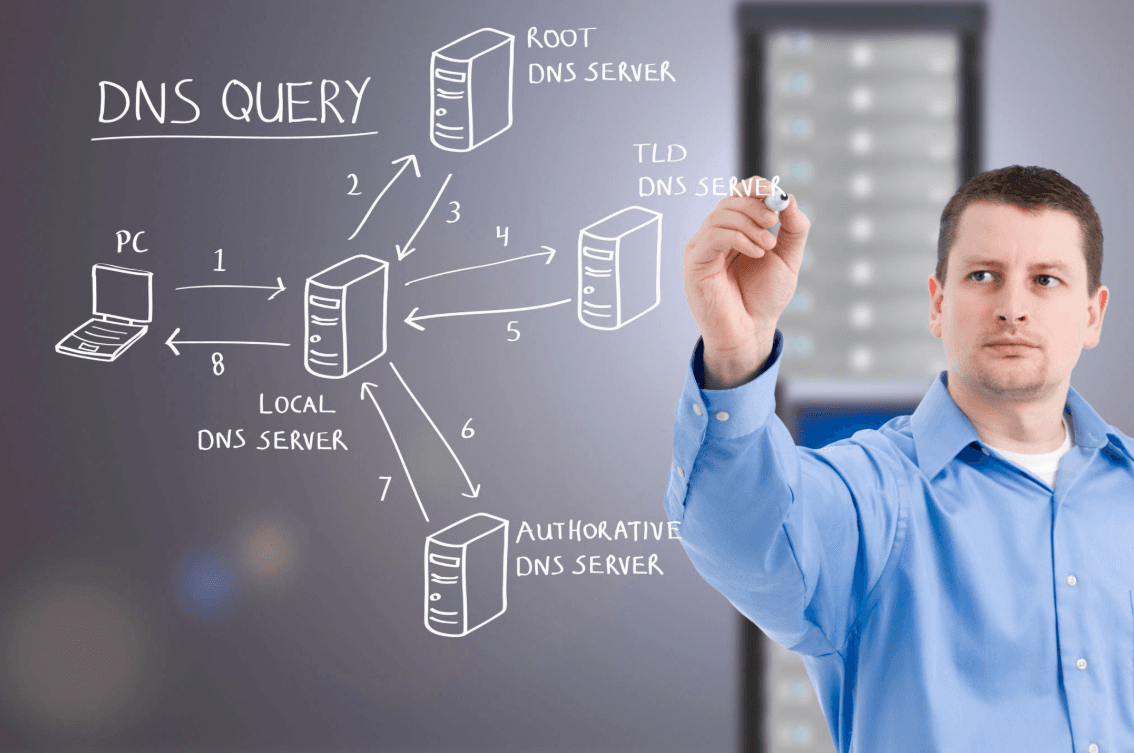
After you type a domain (google.com) in the browser, it first checks its in-memory cache (the Browser and Operating System cache). If it finds the IP address there, it gives you the response immediately. If it doesn't find it, then this request goes to your Internet Service Provider (ISP). This is called the DNS Resolver.
If the DNS Resolver still doesn't have the IP in its cache, the request goes to the Root Server. The Root server can't give you the IP directly, but it gives you a direction—it tells you where you need to go next (like the addresses for .com, .ai, .net, etc.).
After that, the request goes to the TLD (Top-Level Domain) server. Here you can find the directory for all .com domains. It also can't provide you with the main IP, but it responds with something like:
"I don't have the actual IP address, but I know who does. I have the address for this domain's Authoritative Name Server, you need to go ask them."
And here is the rest of the process:
After getting the direction from the TLD server, your DNS Resolver goes to the Authoritative Name Server. This is the final destination or the "main boss." This server is where the website's actual IP address record (known as an 'A record') is officially saved.
The Authoritative server then gives the exact IP address (140.250.195.14) to your DNS Resolver.
Here is how the final steps play out:
Caching: The DNS Resolver takes that IP address and saves it in its own memory (cache). This way, if someone else asks for the same website next time, it doesn't have to do all that traveling again and can provide the IP instantly.
Back to the Browser: The Resolver then passes that IP address directly back to your browser.
Connection: Your browser successfully connects to that IP address, and the website (
google.com) loads immediately.